See us at NECANN in Boston, MA, March 21-22, 2025 at Booth #1621
|
Webinar: Join Us June 25, 2025 @11 AM PST for The Buyer's Blueprint w/ Angela Pih - Register now


.svg)
.svg)
Improving our app daily to match the ever-changing cannabis industry.
Filtering product lines by status is now quicker. On the Product lines page, use the Low stock and Low depth filter pills to view all product lines that are low stock, low depth, or both.
Move through every product line in your order without closing the order guide. Use Previous and Next at the bottom of the order guide to step from one product line to the next, following your current cart filters.
Build product line orders from what's actually available on Nabis vendor menus. View a product line in your cart for any brand that is supplied by Nabis. Choose Select from menu to see matching Nabis wholesale products, then pick exact SKUs and quantities with THC % and case sizes shown.
Product lines now come in two types, so you can track any group of products without cluttering your ordering workflow. Pick a type when you create a product line, or change it anytime in Org Settings.
Build product line orders from what's actually available on Apex vendor menus. View a product line in your cart for any brand that is supplied by Apex. Choose Select from menu to see matching Apex wholesale products, then pick exact SKUs and quantities with THC % and case sizes shown.
Inventory health now works by vendor. See aging inventory, discounts, margins, profit, trended data, and brand and category performance for each vendor, all in one place. Use it to power vendor negotiations backed by real numbers.
“Send if Available” is now better at helping you reach your target depth without overshooting it.
"Do not send" list now automatically surfaces your fully stocked products so your vendor doesn't overstock you on a limited variety.
The order guide and cart are cleaner and put more of the numbers you need right where you build an order.
You can now have your Replenishment Report emailed automatically on the schedule that fits your team. Set the delivery time in your store’s timezone, send it more than once a day so each shift starts from a fresh list, and customize the recipient list per store — no more pulling the report by hand before every shift.
Brand names now show their state code (for example “Wana (OH)”) wherever brands are listed, including filters, dropdowns, and Inventory Health grids. Multi-state operators can now see which state each brand belongs to at a glance.
You can now pick which identifier shows on your Replenishment Report (POS ID, Regulatory ID, or Barcode) so the report matches how your team actually finds packages in the vault. Existing reports keep working, defaulting to Regulatory ID.
The cart summary now shows current days on hand at the brand and category level for each store, right where you’re building the order — so you can see how deep your inventory already is for that brand or category before you commit to a quantity. Click any pill to jump straight to that store’s inventory health, and hover for days-on-hand plus total inventory cost.
A brand-new Packages tab is now live in Happy Buyers, giving buyers package-level visibility across their inventory. Default sort by days aged so your oldest packages are always at the top of the list.
You can now upload invoices and attach them directly to Orders in Happy Buyers. Keep every order's paperwork in one place so buyers and back-office teams can match purchase orders to invoices without digging through old files or emails.
Multiple draft orders are live in Happy Buyers. Create and manage multiple draft orders before finalizing so you can build several purchase orders in parallel. This opens up publishing multiple orders through the API that are ready to refine and send to your vendor.
You can now add a custom line item to an order across multiple stores at once. Store is a multi-select, units are copied to every store, and you can fine-tune the quantities needed for each store.
Units to order now automatically rounds up or down to the nearest case size, so your order quantities line up with how product actually ships.
The location selector now lives next to the search bar above your table. It is in the same place on every screen in the app, for a consistent experience across Inventory Health, Products, and beyond.
Inventory Health pages now have two tabs to analyze your data. The new overview tab goes deeper on category and brand performance across a number of key metrics. Includes top performance brands per category, and vice-versa. While the trends tab holds the weekly and monthly stats you are familiar with.
Add a custom line item any time the product you want to order isn't already in Happy Buyers — either because you've never carried it or it's brand new to the vendor. Add items from either the actions menu or the lower add custom item button.
Product Lines now track performance with new fields: estimated profit $, aged inventory $, discount $, average discount %, average margin %, and inventory cost.
Product lines can now carry a universal brand, set automatically when mappings are configured. This flows through to orders, so a line with three brands can resolve to a single universal brand.
Two updates: an external API is now in beta, and product line settings for desired days on hand, lead time, and depth can be overridden per store.
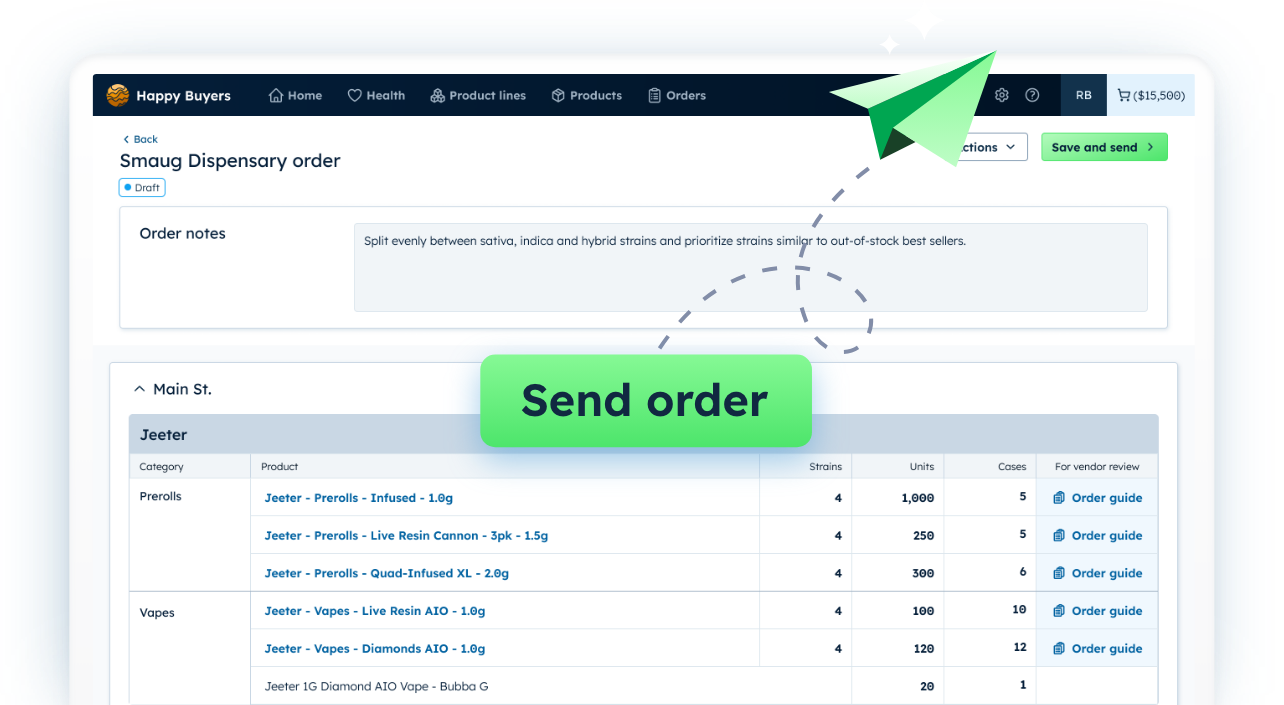
You can now build, send, track orders directly through Happy Buyers.
Meadow customers now get the full Happy Buyers experience, with packages support unlocking aged inventory, inventory cost, and THC %.
The product detail panel now shows a visual calendar heatmap of the last 90 days of sales status, giving context to run rate: when a product was out of stock, and which days sales peaked.
The Replenishment report now includes METRC package IDs, making it easier to act on replenishment directly against tracked packages.
Filter the cart by store, category, and brand, then select items and batch-update days on hand or lead time. Adjust a whole brand or store's order in just a few clicks.
An updated model has lifted AI-generated product line accuracy from the low 60s to around 87% on average, and higher for certain categories.
Alert your store team to what items need to be replenished, or moved from back of house to the sales floor, with a daily automated replenishment report email. Recipients do not need a Happy Buyers login.
Product Line Depth allows retailers to set a target minimum number of unique products (strains or flavors) they want to carry within a specific product line. This feature helps you manage assortment variety — not just total inventory units — ensuring customers have access to the range of product options they expect. The status field now flags when a line is low stock, low depth, or both.
Update case size directly from the Products tab actions menu.
Sort on multiple columns at once via the actions menu, or hold SHIFT while selecting column headers.
A new Product Lines table lets you view and sort all product line information and add product lines directly to a cart.
Happy Buyers now shows THC percentage. View THC per package in a product's view panel, or add average THC % on hand to your dashboard.
More control and clarity for orders: adjust days on hand and lead time to instantly recalculate units to order, manually override the recommendation, reset to the calculated value, and reference new columns like units per day and predicted days on hand.
Inventory rooms got quality-of-life upgrades: batch-update multiple rooms at once, export rooms as a CSV, and sort or filter by store and room type.
Freeze table columns to keep key information, like product names, visible as you scroll wide tables. The sorted header column now stands out more clearly too.
A suggested cut list of the bottom 20% of products from every category that have delivered lowest total profit over the past 30 days is now live on the Home page, helping you quickly spot candidates to drop.
Update product you no longer wish to carry with the new discontinue status, so they're excluded from reorders and won't land on your PO.
Happy Buyers now has a home dashboard, giving buyers easy quick lines for their key inventory metrics and reports.
Updated filters for All Products, In Stock, and Out of Stock, plus an easier way to select all infused or all non-infused products.
Filter aged inventory by cost. Set a minimum of $1 to see any aged product, or raise the threshold to surface products where aged-inventory cost is getting out of hand.
Units at distro and Distro status columns give teams running a centralized distribution workflow visibility into units held at the distribution center.
Discount $ and % columns on Inventory Health and All Products tracks the total discounted amount from each line item over your lookback period. Track and trend discount % with weekly and monthly trends on all Inventory Health pages.
A refreshed Product line view with easier editing and AI-created groups, and cart export as a polished, date-stamped PDF.
New brand pages surface week-over-week and month-over-month trends plus a 30-day sales picture. Click any data point to see a bar graph of trends over time.
View total inventory cost and aged inventory cost (units 61+ days aging) via the Actions dropdown.
Click to open a new tab in All Products with your selected store, category, and brand filters already applied, without losing your place in Inventory Health.
The store selector moved into the left filter panel on All Products, unlocking per-tab store selection and bookmarking searches with specific stores selected.
Aging is now live on Inventory Health for Dutchie and Flowhub customers. Add the columns to your view, especially on the Brand tab, to see which brands have inventory sitting around.
Aging inventory buckets are now live on the All Products page and the View Product panel. Toggle the columns via Actions to spot stagnant, non-moving product.
The All Products page now sorts descending by units per day by default, surfacing top movers instead of accessories or non-cannabis items.
Inventory health is now available at the store, category, and brand levels. Start at store-level metrics and work down through categories and brands, with easy multi-location comparison.
Click into a product line to see how long its items have been sitting on the shelves, helping with reorder decisions, sales planning, and store-level breakdowns.
Map your POS categories to Happy Buyers categories directly in org settings, without first creating a demand group. This keeps categories consistent across dashboards and reports.
Happy Buyers now surfaces average margin, dollar amount sold, and estimated profit for any product over a selected lookback period, with no mental math required.
Account admins can now add, edit, and remove end users, and view each user's last activity date, all self-service.
Apply batch case-size updates to a group of products right from the Create demand group pop-up, for faster setup.
See the impact Happy Buyers can have on your cash flow, time, and peace-of-mind. 14 days. No risk.


.png)
.png)
.png)